Take Profit and Stop Loss Orders (TP/SL)
Take Profit (TP) and Stop Loss (SL) orders are essential tools designed to help traders automate risk management and secure profits on their positions. They allow users to pre-set price levels that, when reached or crossed by the market, will automatically submit a closing order for the position.
What are TP/SL Orders and Their Function?
TP/SL orders are essentially Trigger Orders that enable you to:
- Take Profit (TP): Automatically lock in profits. When the market price reaches your set target, a closing order is triggered, helping you secure gains in favorable market conditions.
- Stop Loss (SL): Limit potential losses. When the market price moves against your position and reaches your defined price, a closing order is triggered to help you exit the position before losses escalate.
Trigger Price Basis
The trigger price for TP/SL orders is always based on the Mark Price of your contract.
- Stop Loss (SL) Trigger Conditions:
- For a Long Position: Triggered when the Mark Price is less than or equal to your set SL price.
- For a Short Position: Triggered when the Mark Price is greater than or equal to your set SL price.
- Take Profit (TP) Trigger Conditions:
- For a Long Position: Triggered when the Mark Price is greater than or equal to your set TP price.
- For a Short Position: Triggered when the Mark Price is less than or equal to your set TP price.
⚠️ Important Disclaimer
TP/SL is solely an automated assist program and does not guarantee successful order execution (Fill).
- Execution Depends on Liquidity: Once a TP/SL order is triggered, the system automatically submits a closing order to the order book. Whether this order is fully or partially executed depends entirely on the current order book and market liquidity. In volatile or illiquid markets, the submitted order may not be filled at the expected price, or at all.
- Slippage Risk: Especially during rapid market movements, the actual execution price may deviate from your set trigger price (known as slippage).
- Active Monitoring: Users should actively monitor their position status and order status to ensure their risk management strategy is executed and to prevent unnecessary losses.
TP/SL Order Types
Our perpetuals DEX offers two dimensions for setting TP/SL to cater to different trading needs:
- Order-Level TP/SL Orders: TP/SL attached to the initial opening order.
- Position-Level TP/SL Orders: TP/SL set directly on the existing position.
⚠️ Order Limit: Each trading pair has a maximum limit of 10 active TP/SL orders (combined total of both Order-Level and Position-Level). Please manage your TP/SL orders accordingly.
TP/SL Attached to the Opening Order (Order-Level TP/SL)
This TP/SL allows you to pre-define the corresponding Take Profit and Stop Loss prices when submitting your opening order.
OCO (One-Cancels-Other) Behavior
Order-Level TP and SL are linked as an OCO pair. When one order is triggered and filled, the other is automatically cancelled.
- Both TP and SL target the same order quantity. Once one is executed, the position (or portion) they were designed to close no longer exists — making the other order invalid.
- Example: You open a 1 BTC Long with TP at $105,000 and SL at $95,000. If price rises to $105,000 and your TP is filled, the SL at $95,000 is automatically cancelled because the 1 BTC position it was meant to protect is already closed.
![_max-w-[600px]](/_next/static/media/68cc69ec62aeb517dc81d244387909fd.1d6938f5.png)
- In the Execution Panel, check the TP/SL option to reveal the input fields (as shown in the image below).
- Set your desired Higher Price and Lower Price. You can input the price directly in DUSD or use the percentage (%) input.
- Visual Feedback: Immediately below each input field, you will see the estimated P&L for both Long and Short scenarios if the order is executed and the market reaches that TP/SL price.
- Higher Price (Top Field): Shows estimated Long Profit / Short Loss.
- Lower Price (Bottom Field): Shows estimated Long Loss / Short Profit.
- Once your opening order is fully filled, the system will automatically create and activate the corresponding TP/SL orders for you.
- If the opening order is only partially filled, the TP/SL orders will not be activated until the order is completely executed.
TP/SL for Existing Positions (Position-Level TP/SL)
Position-level TP/SL allows users to add or modify Take Profit/Stop Loss orders for the entire current position at any time. This is typically used to manage and close the remaining balance of the position.
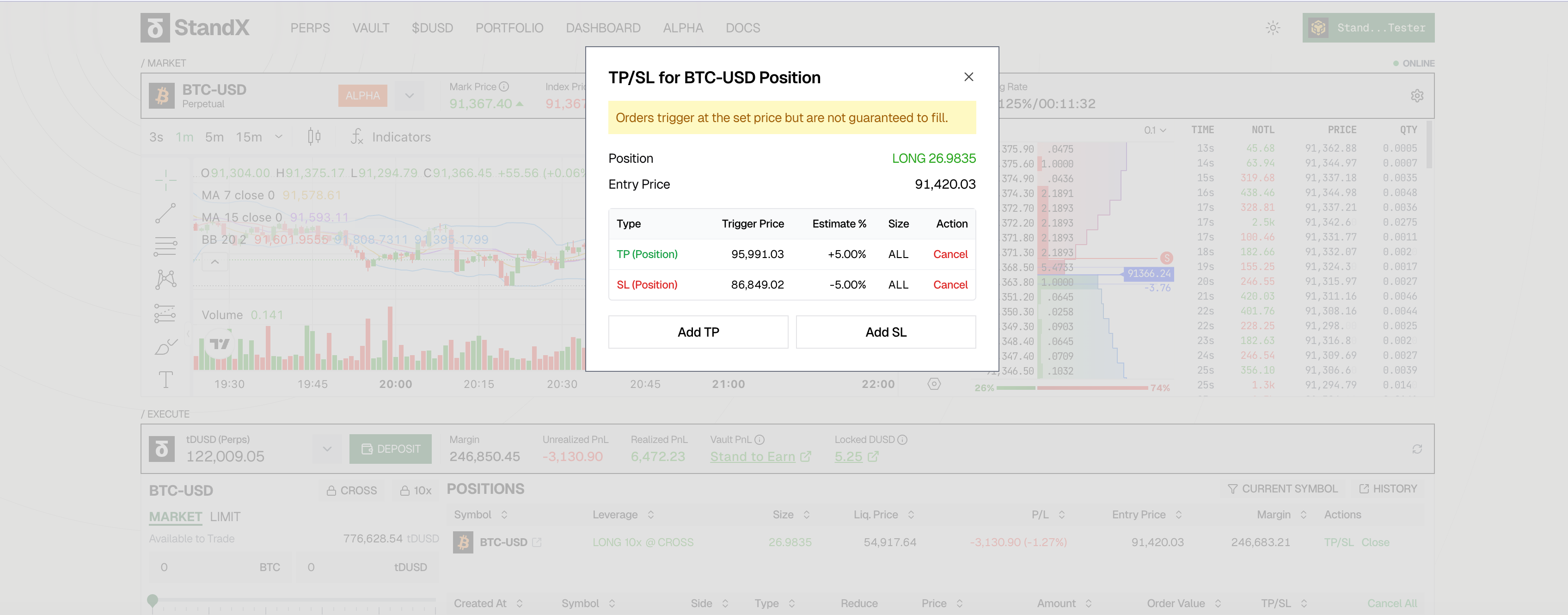
- Close All Remaining Position: You can set a trigger price that, once reached, will prompt the system to submit a closing order to close all of your remaining position for that contract.
- Independent from Opening Orders: Regardless of whether your initial opening order included TP/SL, you can always add, modify, or delete Position-Level TP/SL via the position panel.
Multiple Partial TP/SL Orders (Scaling Out)
You can set multiple Position-Level TP/SL orders with different trigger prices and quantities to scale out of your position gradually.
Example: Scaling Out with Multiple TPs
| Order | Trigger Condition | Close Quantity |
|---|---|---|
| TP 1 | Price +2% | 10% of position |
| TP 2 | Price +10% | 20% of position |
| TP 3 | Price +20% | 30% of position |
All three TP orders coexist independently. As price rises, each TP triggers at its respective level, allowing you to lock in profits progressively.
OCO Behavior for 100% Close Position TP/SL
When you set both a TP and SL to close 100% of your position, they become an OCO pair.
- If the TP is triggered and filled → the SL is automatically cancelled
- If the SL is triggered and filled → the TP is automatically cancelled
Both orders target the entire position. Once one fully closes the position, the other has nothing left to close.
Key Distinction:
| Scenario | Behavior |
|---|---|
| Multiple partial TP/SL orders (e.g., 10%, 20%) | Coexist independently — each triggers at its own price |
| TP + SL both set to 100% close | OCO — one triggers, the other is cancelled |
⚠️ Compatibility and Triggering
Position TP/SL and Order TP/SL are not mutually exclusive; they can coexist.
- Both are based on the Mark Price and whether a closing action is triggered depends on the different trigger prices set on each order.
- For example, if your initial opening order has a TP price of
X(Order-Level), and you later set a further TP price ofYon the position (Position-Level).- If the Mark Price reaches
Xfirst, the Order-Level TP order will be triggered. - If, after
Xis triggered, you still have a remaining position, and the Mark Price continues to move towardYand reaches it, the Position-Level TP order will then be triggered.
- If the Mark Price reaches
FAQ: Why Didn’t My TP/SL Trigger?
If your TP/SL order was not triggered as expected, it may be due to one of the following reasons:
Case 1: Insufficient Margin or Position Size Conflict
When a TP/SL order is triggered, the system attempts to create a closing order. However, this can fail if there’s not enough available margin or if other orders are already reserving part of your position.
Example A: Margin Shortage
| Step | What Happens |
|---|---|
| 1 | You open a 1 BTC Long position at $100,000 |
| 2 | You set a Stop-Loss at $95,000 |
| 3 | You also place several new limit Long orders, which reserve most of your available margin |
| 4 | Price drops to $95,000, and your position is now at a loss — your margin has decreased |
| 5 | The SL triggers, but the system cannot create the closing order because your remaining margin (after losses + reserved by other orders) is insufficient |
Result: SL fails to execute due to insufficient margin.
Example B: Position Size Conflict with Other Orders
| Step | What Happens |
|---|---|
| 1 | You have a 1 BTC Long position |
| 2 | You set a TP order to close 0.8 BTC when price rises |
| 3 | You also create a separate Reduce-Only order to close 0.4 BTC |
| 4 | Now, 0.4 BTC of your position is already “reserved” by the Reduce-Only order |
| 5 | Available position to close = 1 - 0.4 = 0.6 BTC |
| 6 | When TP triggers, it tries to close 0.8 BTC, but only 0.6 BTC is available |
Result: TP fails because the requested close size (0.8 BTC) exceeds the available position (0.6 BTC).
Solution:
- Cancel some open orders to free up margin
- Ensure your TP/SL close size doesn’t conflict with other Reduce-Only orders
- Check that your total close orders don’t exceed your position size
Case 2: Price Already Passed the Trigger Level
TP/SL orders are triggered when the price moves to the trigger level, not simply when the price is at or beyond the level.
Example:
You hold a Long position on BTC at $100,000 and want to set a Stop Loss at $95,000 to limit your losses if the price drops.
- You set the SL trigger price at $95,000
- However, at the time you set this order, the current Mark Price is already $93,000
- The price is indeed below $95,000 — Yes
- Did the price drop to $95,000 after you set the order? — No, it had already fallen past that level
Result: The SL will not trigger because the system is waiting for the price to reach $95,000, but the price has already moved beyond it. The trigger condition requires the price to cross the threshold after the order is placed.
Solution: Set a new TP/SL at a price level that the market has not yet reached.