This article is based on the official StandX docs. For the source of truth, see Network Yield and Community Builder.
StandX Network Yield is a referral and network rewards program, and the rule is easy to grasp. When someone you invited trades, you get a cut of their fees. When you trade yourself, you get some of your own fees back.
What makes it interesting is that the rate isn’t fixed. It’s a path you climb. The same referral system behaves very differently as your role grows from a regular user, to a Community Builder, and finally to a Community Owner running a full community. How much you can allocate, and how you play it, changes at every step.
Whenever you see a percentage, keep two separate money flows in mind and nothing will trip you up:
- Trader Rebate: fees you earn back on your own trades.
- Commission: the pool you get to allocate when people you invited trade, split between you and them.
They come from different places and rest on different bases, so you can never add them into one “total rebate rate.” Let’s walk up the path one step at a time.
Step 1: Accept an Invite
Join StandX through someone’s referral link. Once the invite relationship is set, you immediately get two things:
- Trader Rebate: fees returned on your own trades, at the rate shown on your page.
- Points Bonus: both the inviter and the invitee earn a +5% bonus on the invitee’s base points, covering Trader Points, Maker Points, and Holder Points.
Keep in mind the Points Bonus is a boost on points, not a fee rebate. They’re two different benefits. Once the invite relationship is set, you usually can’t switch it at will unless the page gives you an option to.
Step 2: Activate Network Yield and Unlock Your Own Allocation
Once your cumulative personal trading volume reaches 500,000 DUSD, you can activate Network Yield. That unlocks a 5% base Commission and generates your own referral link. Activation counts your entire trading history on StandX, including everything you traded before Network Yield launched.
From here you pick up one new idea. Commission is an allocatable budget, not the final rate you pocket. It always splits into two parts:
Commission = Referral Receives (goes to the invitee) + You Keep (stays with you)Your Share Rate decides that split. Raise it and your invitees get more, your link looks more attractive, and you keep less. Lower it and the reverse. A 100% Share means you hand your whole Commission to your invitees. It does not mean their fees are waived.
Step 3: Level Up the Yield Table as Your Network Grows
After activation, your Commission climbs with volume:
| Level | Commission | Unlock condition |
|---|---|---|
| LV1 | 5% | 500,000 DUSD personal history volume |
| LV2 | 10% | 2.5M DUSD Network Volume |
| LV3 | 15% | 7.5M DUSD Network Volume |
| LV4 | 20% | 15M DUSD Network Volume |
Keep the two volumes apart. LV1 looks at your personal history volume, launch included. LV2 through LV4 look at Network Volume, meaning the trading volume you and your invitees generate together after launch. Commission caps at 20%.
Here’s a full example. Alex joins through a referral link, and his page shows a 15% Trader Rebate. His personal history volume then reaches 500,000 DUSD, so he activates LV1 and picks up a 5% Commission. If one of his invitees generates 100 DUSD in fees, the Share splits it like this:
| Where it goes | Calculation | Amount |
|---|---|---|
| Invitee rebate | 100 × 3% | 3 DUSD |
| Alex keeps | 100 × 2% | 2 DUSD |
| Total allocated | 5% | 5 DUSD |
Alex now runs two independent income lines. On his own trades he gets the 15% Trader Rebate. On his invitees’ trades he keeps 2% while they take 3%. Both run at once, but 15% and 5% don’t add up to 20%. As Network Volume grows, Alex reaches LV2, his Commission becomes 10%, and he can reset the Share. The logic stays the same.
Step 4 (Advanced): Become a Community Builder
If you run a community, you can be invited to become a Community Builder. This is a community role inside Network Yield, not a tier stacked above LV4 for regular users.
The key change for a Builder: your allocatable Commission is set by the Community Owner through a Group, so it no longer follows the LV1 to LV4 table directly.
A real Builder page (see below):
- Commission 18.00%: the budget a Builder splits with invitees. The page shows
You 5.5% + Share 12.50%, so the Builder keeps 5.5% and passes 12.50% to invitees. - Trader Rebate 20.00%: what the Builder earns back on their own trades.
Figure 1: Community Builder page
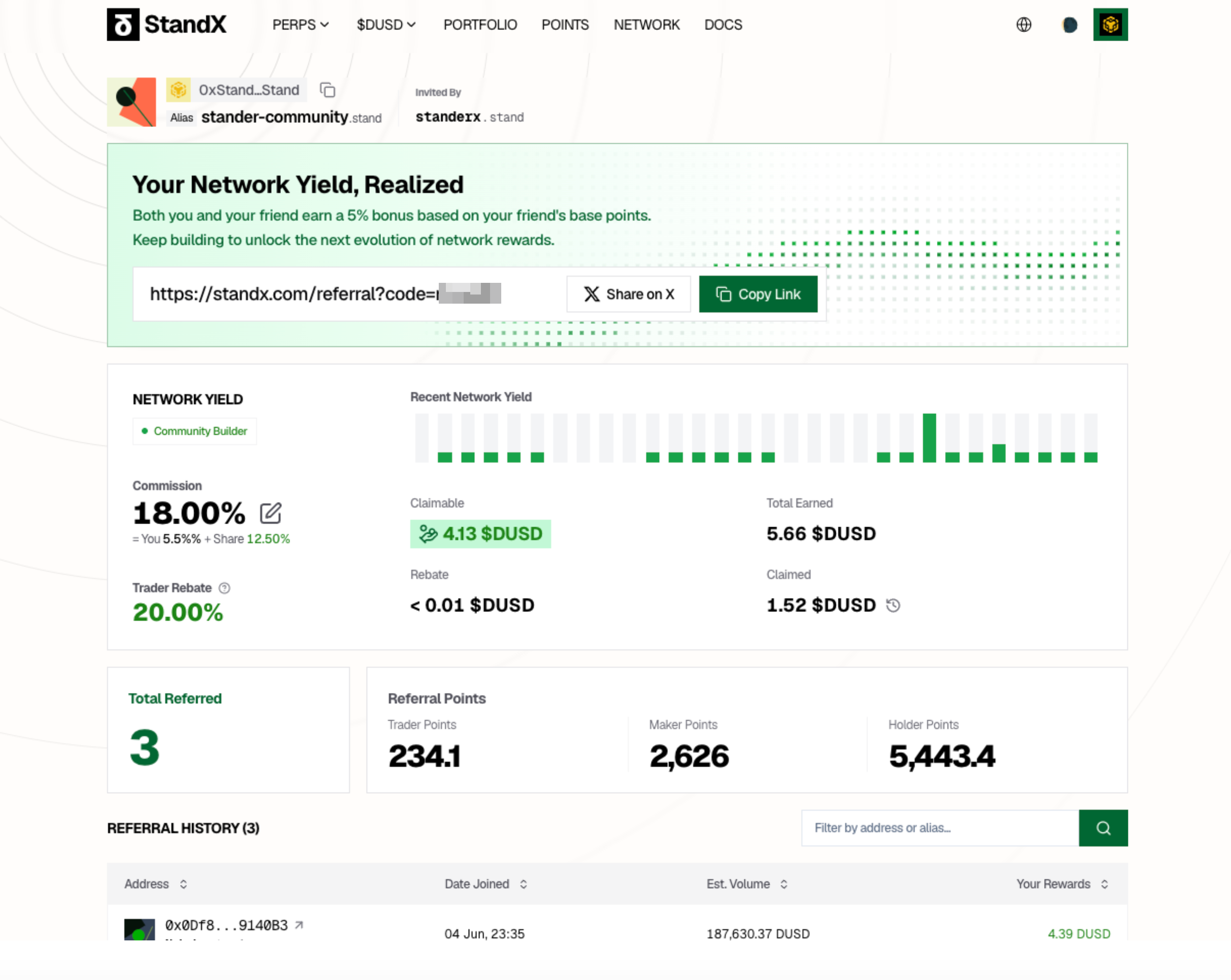
18.00% is the Commission on invitees’ trades. 20.00% is the Builder’s own Trader Rebate. Different sources, so they don’t add up.
Put plainly, a Builder just brings people in. You invite regular users, set their split, then watch your referral history and earnings roll in. Creating Groups or recruiting other Builders is the Owner’s job, not something a Builder can do.
Step 5 (Advanced): Become a Community Owner
A Community Owner is a standalone community management role, and again it isn’t an LV5 for regular users. An Owner’s value comes from scaling the whole network through a limited set of Builder nodes.
Figure 2: Community Owner page
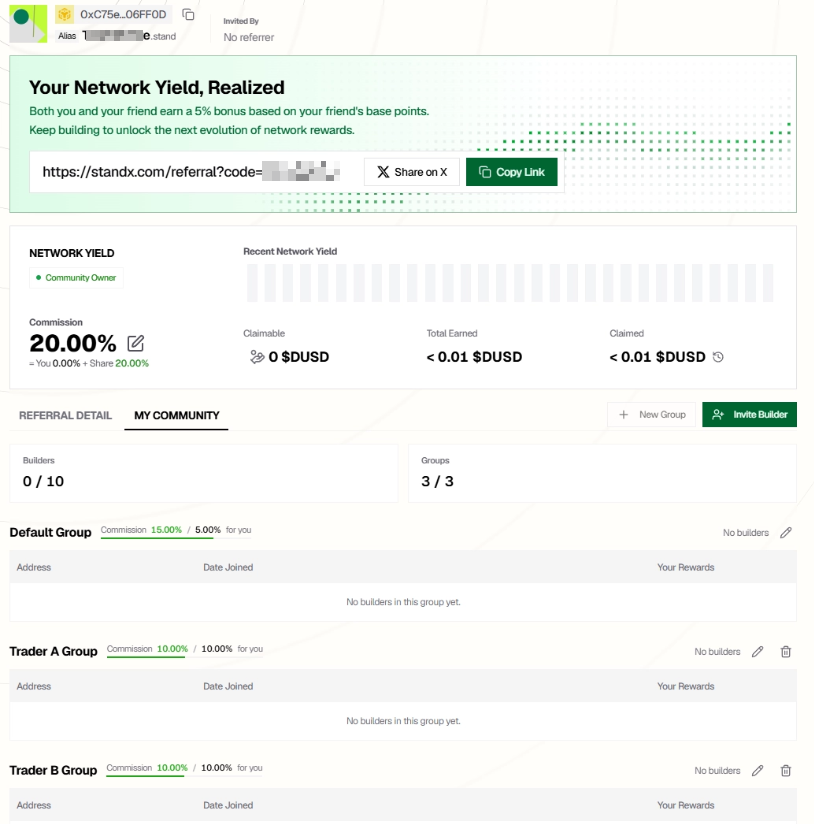
The Owner page adds a My Community tab for managing Builders and Groups. Here Commission is 20.00% with three Groups already set up: Default (Builder 15%, you keep 5%), plus Trader A and Trader B (both Builder 10%, you keep 10%).
Unlike a regular invite, which splits once, a community can split twice:
Community Owner → Builder → Invited userThe Owner first splits between themselves and the Builder, then the Builder splits again between themselves and the invitee. Take the Trader A Group above, where the Builder gets 10% and the Owner keeps 10%:
Owner total 20% = Owner Keep 10% + Builder Commission 10%
Builder 10% = Builder Keep 2% + Referral Receives 8%
If the invitee generates 100 DUSD in fees, the final split is 8 DUSD to the invitee, 2 DUSD to the Builder, and 10 DUSD to the Owner, for 20 DUSD in total.
Through Groups, an Owner sorts different Builders into different incentive tiers, and each Group carries its own Builder Commission and Owner Keep. Want to reward your core Builders more? Raise their Builder Commission, like the 15% in the Default group. Want to keep more for yourself? Lower it. On the current page an Owner can manage up to 10 Builders and 3 Groups.
Figure 3: Create Group dialog
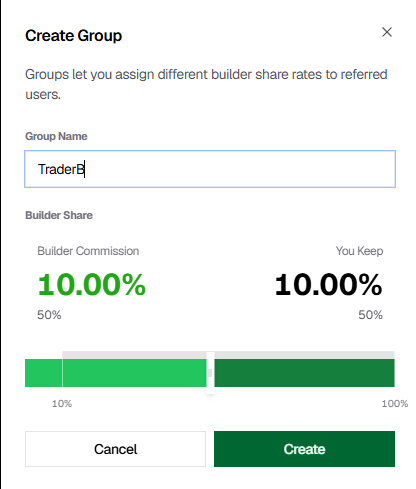
When you create a Group you set that tier’s split. Here Builder Commission is 10.00% and You Keep is 10.00%, so the Builder can allocate 10% while the Owner keeps 10%.
A seasoned Owner keeps reading the room: which Builders bring real trading volume, which only bring signups, which ones deserve a higher incentive Group. It’s a constant balance between growth, retention, and profit.
Comparing the Three Roles
| Item | Regular inviter | Community Builder | Community Owner |
|---|---|---|---|
| Commission source | LV1 to LV4 upgrades | Owner / Group config | Community role config |
| Can invite regular users | ✅ | ✅ | ✅ |
| Can invite Builders | - | - | ✅ |
| Can create/manage Groups | - | - | ✅ |
| Follows LV upgrades | Yes | Not the LV table | No, an Owner isn’t LV5 |
| Core job | Grow a personal invite network | Bring users in and run their rebates | Design Builder incentives and community structure |
Common Misconceptions
- Commission is your final take. Wrong. Commission is the total pool, and it always splits into You Keep and Referral Receives.
- Commission and Trader Rebate add up. Wrong. One comes from your invitees’ trades, the other from your own, on different bases.
- The sample rates on the page are a lasting promise. Wrong. Numbers like 18.00% and 20.00% shift with your role, your Group, your upstream config, or platform rules. When you quote them, add “as shown on the current page” or “under the current config.”
FAQ
Q: What are Claimable, Rebate, Total Earned, and Claimed? Claimable is what you can withdraw right now. Rebate is your running rebate total. Total Earned is your lifetime earnings. Claimed is what you’ve already withdrawn. Fields vary a little by role, so trust your account page.
Q: How long until a claim arrives? It usually lands in your Perps wallet after processing. The page example says within 24 hours. Actual timing follows the page status.
Q: Before I activate Network Yield, can I promote my referral link? Better not. Until your page shows an allocatable Commission, you shouldn’t promise invitees a fixed rebate. Confirm your Network Yield status and final config first, then promote.
Closing
The real value of Network Yield isn’t any single percentage. It’s the path itself. It links trading, referrals, and community building into one continuous growth curve. You can simply trade for your own rebate, invite a few friends for extra income, or grow all the way to running a community of hundreds and let the whole network throw off cash flow for you. Other people trade, and you still earn. That’s what a Network is for.
The entry bar is low. All you need is a referral link. The ceiling is high, and the further you climb, the bigger the scale you can move. Get clear on the direction of the money and on the roles, then let time and your network do the compounding.
Now that you understand the whole path, there’s only one thing left to do: grab your referral link and take the first step.
Network Yield is really just one piece of what StandX builds. Through its SIPs, StandX keeps turning complex financial machinery into products that ordinary people can pick up and share in. Every one of them is a fun read:
- SIP-5A: Community Maker Yield. A whole community makes markets together and shares the market making yield.
- SIP-5: Universal Markets Listing. Permissionless listing that lets you trade almost anything.
- SIP-4: Block Options. Options rebuilt as composable onchain rights.
- The full SIP list.
All rates, thresholds, and claim states follow what StandX shows in real time and its latest official rules.