My StandX Maker Points Bot Experience and Maker Uptime Results
In this article, I’ll explain the bot system I built on StandX for Maker Points, the logic behind how I place limit orders, why I keep my weekend and weekday settings different, and how I accumulate Maker Hours on the Maker Uptime side.
My goal was to accumulate Maker Points on StandX. To do this, I configured the bot to create limit orders on both the long and short sides. I wanted the orders to stay on the order book, to be positioned at the bps distances I set from the mark price, and for orders that drift away to be renewed by the bot.
Bot System
The bot I built can run on multiple pairs simultaneously. The interface shows BTC-USD, ETH-USD, XAU-USD, XAG-USD, and CL-USD options. The quantity can be set independently for each pair. The active duration, total order count, fills, and cancellations can be tracked in real time at the bottom bar of the screen.
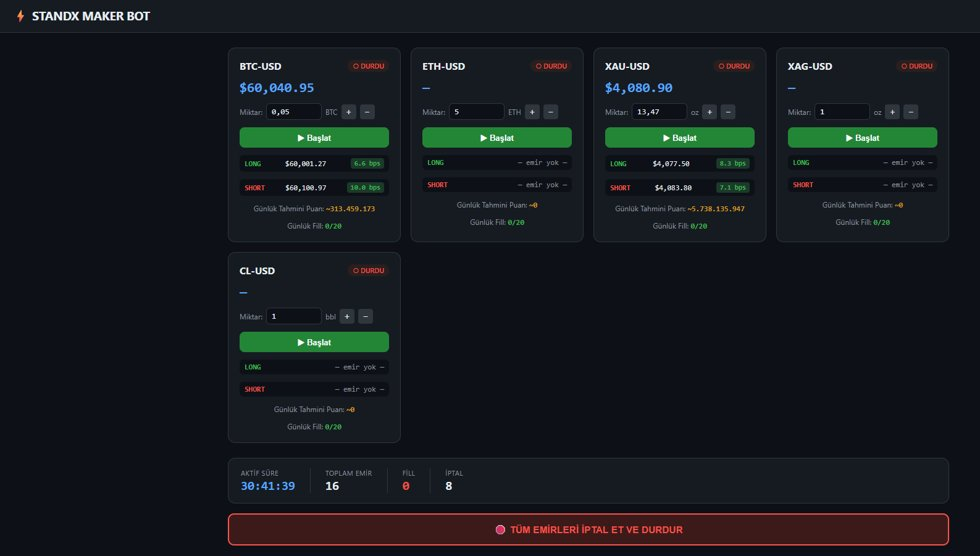
StandX Maker Bot interface
This past weekend I chose the XAU-USD pair. The bot interface shows an active duration of 30 hours 41 minutes. The total runtime was 35 hours; this difference comes from stopping and restarting the bot in between, the counter resets but the system keeps running. A total of 16 orders were created, fills were 0, and cancellations were 8. The cancellation count of 8 comes from the bot renewing orders that drift out of range. Running without fills was exactly the intended outcome.
How Do Maker Points Work ?
The order just needs to stay on the order book for more than 3 seconds. Even if the order does not fill, points accrue. Proximity to the mark price directly determines the multiplier.
Between 0 and 10 bps, the multiplier decreases from 100% to 40%. Between 10 and 30 bps, it decreases from 40% to 12.5%. Between 30 and 100 bps, it decreases from 12.5% to 0%.
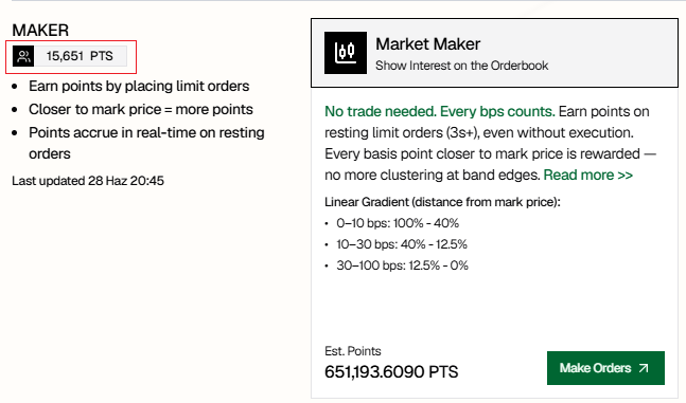
Maker Points interface
The most efficient zone is clearly the 0 to 10 bps range. I build my weekend settings around this band.
Weekend and Weekday Settings
On weekends, the market tends to move more quietly. Orders can stay close to the mark price and sit on the order book for a long time without filling. That’s why I build my weekend settings around the 0 to 10 bps range. On weekdays, when volatility picks up, I don’t want orders to keep filling. I widen the distance to prevent that.
Weekend settings:
TARGET_BPS: 7
CLOSE_BPS: 6
FAR_BPS: 10
TP_BPS: 13
SL_BPS: 5
Weekday settings:
TARGET_BPS: 15
CLOSE_BPS: 11
FAR_BPS: 19
TP_BPS: 20
SL_BPS: 7
I chose 7 as the TARGET_BPS for weekends. Orders stay within the 0 to 10 bps range and operate in the most efficient band for Maker Points. I set CLOSE_BPS to 6; when the price gets too close to the order, the bot moves more cautiously. FAR_BPS automatically renews orders that drift beyond 10 bps; they’ve already left the target band at that point. For post-fill management: TP at 13 bps, SL at 5 bps.
The reason I widen the distance on weekdays is fill control, not the multiplier. At 15 bps the multiplier is lower, but orders stay on the order book much longer.
Maker Uptime Connection
The Maker Uptime program requires active orders on both the bid and ask sides within 10 bps during each hour, along with a minimum uptime requirement.
Standard tier requires 30 or more minutes active per hour and is evaluated with a 0.5x multiplier. Boosted tier requires 42 or more minutes active per hour and is evaluated with a 1.0x multiplier.
The Maker Uptime program has a monthly pool of 5 million tokens distributed proportionally based on Maker Hours.
For the XAU-USD pair, the maximum order size per side is 30 XAU and the maximum Maker Hours per hour is 1. My 13.47 XAU falls below this cap. The proximity weight at around 7 bps corresponds to approximately 116%. 13.47 XAU at this weight produces approximately 15.63 XAU in scaled size. Based on 30 XAU per unit, this means approximately 0.52 Maker Hours per hour.
Getting 13.67 Maker Hours over 35 hours is a consistent result with this calculation.
The weekend system naturally meets this requirement. Orders stay close to the mark price and remain on the order book for hours without filling.
This Weekend’s XAU Position
I activated the bot on the XAU pair. Due to my limited deposit, I used approximately 40x leverage based on my own risk preference.
My total limit order size came to 26.94 XAU, equivalent to approximately 110,000 DUSD in position size.
Short side: 13.47 XAU, approximately 55,000 DUSD.
Long side: 13.47 XAU, approximately 55,000 DUSD.
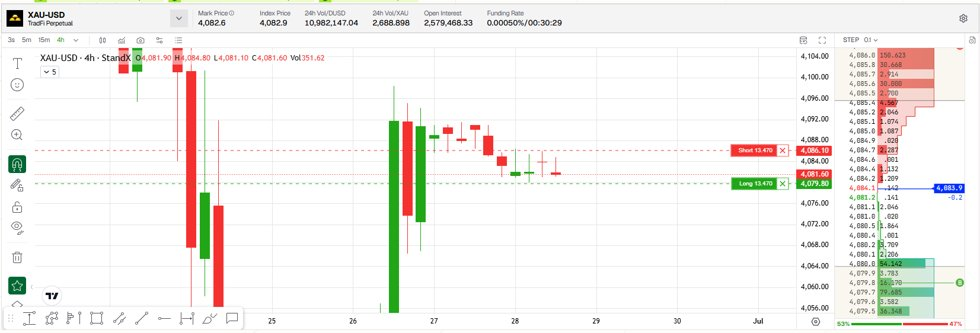
The short order was opened at 4,086.1 on June 28 at 15:18, and the long order at 4,079.8 at 14:48. the long was at 4,077.50 at 8.3 bps and the short at 4,083.80 at 7.1 bps. This difference comes from the bot having renewed the orders; the system continuously updates based on the mark price.
XAU-USD order table, opening times and prices

I ran the system for a total of 35 hours.
Results
Over 35 hours, I earned 78,751 Maker Points and accumulated 13.67 Maker Hours.
Maker Points (bot): 651,193.61
Maker Points (referral): 15,651
Total Maker Points: 666,844.6
Maker Hours (35h XAU run): 13.67
Total Maker Points: 666,844.6
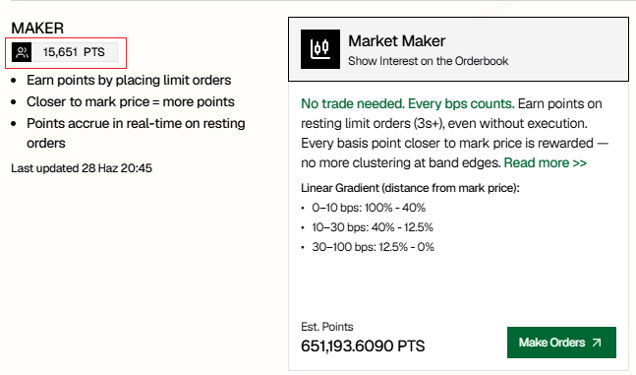
Bot-accumulated Maker Points: 651,193.61
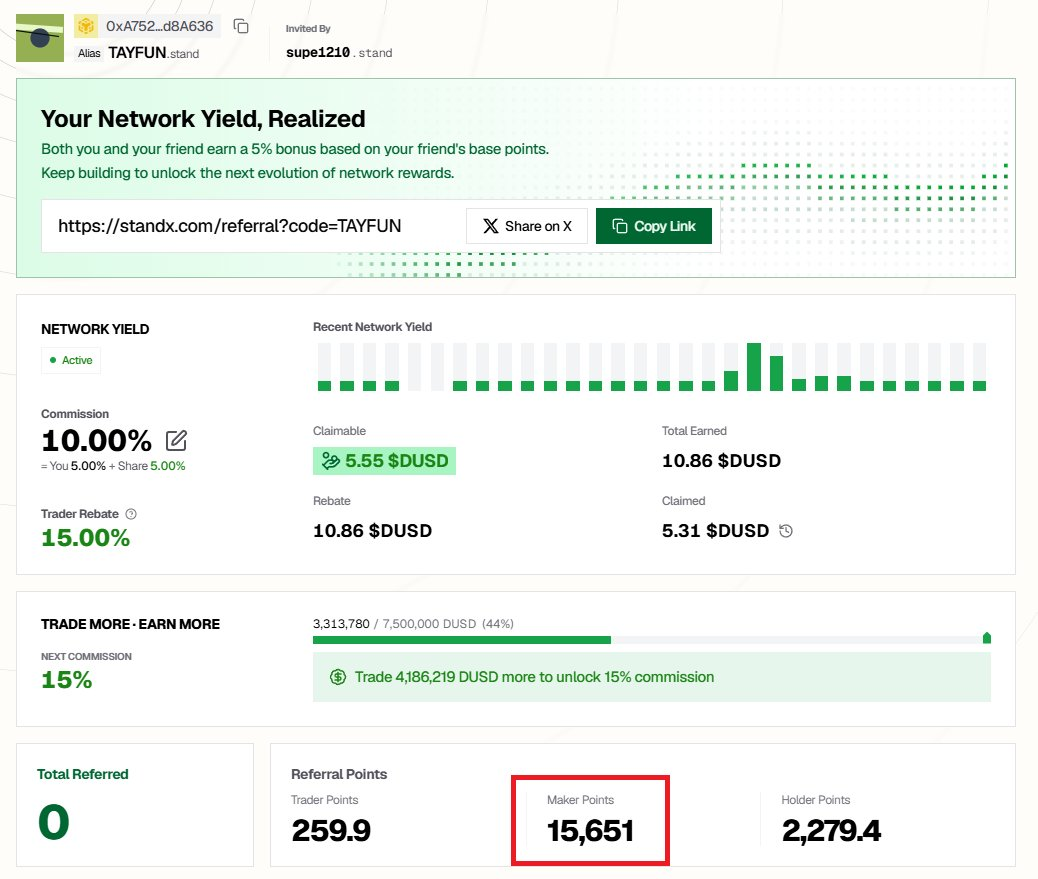
Referral Maker Points breakdown: 15,651
My goal is 1 million Maker Points. Since the Maker Uptime program distributes 5 million tokens monthly, I also pay close attention to the Maker Hours side.
Maker Uptime Statistics
0:02 / 0:31
VIDEO: Maker Uptime statistics, live view
In April 2026, I accumulated 4.38 Maker Hours and received 1,936.32 tokens. In May 2026, I accumulated 26.12 Maker Hours and received 12,207.61 tokens. In June 2026, my Maker Hours are at 24.42 and the month is still ongoing.
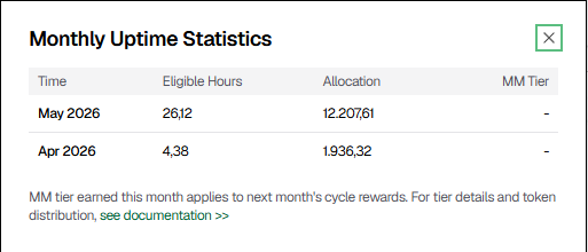
Monthly Uptime Statistics
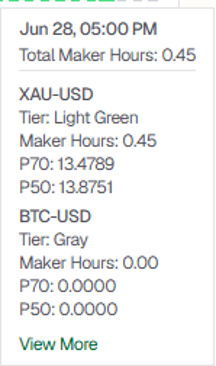
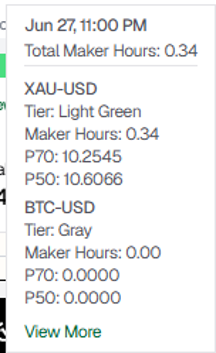
Looking at the snapshot data: on June 28 at 17:00, 0.45 Maker Hours were earned for XAU-USD in that hour and marked as Light Green tier. P70 was 13.4789, P50 was 13.8751. On the June 27 at 23:00 snapshot, 0.34 Maker Hours accrued; P70 was 10.2545 and P50 was 10.6066.
June 28, 0.45 Maker Hours
June 27, 0.34 Maker Hours
Risk Note
Two-sided limit orders require care, especially at high leverage. Defining the TP, SL, bps distance, and order renewal logic upfront is essential. The reason I use tighter distances on weekends and wider ones on weekdays is to control fill risk based on market conditions.
What I’ve shared here are real results from my own system, not investment advice.
Features I’d Like to See in the Future
The thing I’d most like to see from StandX is a comprehensive and stable mobile app. Currently on mobile we connect via QR code. This system works for general use, but the connection can drop when you’re out. When the connection drops, regaining access becomes difficult and instant intervention in open trades may not be possible. When we’re not at our PC, we need to monitor positions, view open orders, track TP and SL status, and intervene quickly when needed. Having their own mobile app would significantly strengthen the user experience in this regard.
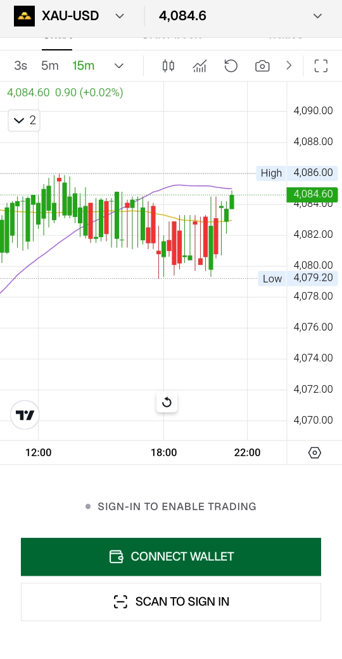
StandX XAU-USD mobile view
Beyond that, an advanced notification system would also be very useful. Receiving notifications when an order fills, when TP or SL triggers, when margin risk increases, or when price approaches a set level would be great. If a bot and API tracking screen were also available through the mobile app, users could manage the risk side much more comfortably without having to stay glued to a screen.